

I took this flight tracking tool out for a spin for three months to see if it’s worth the money. Spoiler alert: It was.
Here’s the thing about booking flights: you never really know if you’re getting the best possible deal. Prices change by the hour, and there’s always that nagging feeling that somewhere, buried in an algorithm you’ll never understand, there’s a better deal you just haven’t found yet.
That’s why I’ve never been a very big fan of the pre-travel shuffle through tab after tab of booking sites. That’s when I came across RatePunk. Could a single platform actually streamline the process, or would this be another tool that promised more than it delivered?
This review is the result of three months of genuine testing. Real trips were booked. Money was tracked carefully, all to answer a single question: Can that $23.99 membership fee realistically pay for itself with smarter booking decisions?
What Is RatePunk?
RatePunk is primarily a flight-deal discovery tool. What surprised me at first was that RatePunk doesn’t actually sell flights or claim to offer some magical below-market pricing that other platforms can’t access. Instead, it scans currently available deals across multiple providers – the same deals you could theoretically find yourself if you had infinite time and patience – and redirects you to the seller when you’re ready to book. I really appreciate this distinction as it sets realistic expectations right away rather than promising some insider secret that doesn’t exist, only to let you down later.
The algorithm works differently from typical price-sorting systems. Rather than just showing you the absolute cheapest option and calling it a day, RatePunk identifies what they call “best price-quality matches,” which in practical terms means highlighting flights with shorter durations or fewer layovers at comparable price points, making comparison much more straightforward. With it, you can avoid the $180 flight that looks great… until you notice the eleven-hour layover in Detroit.
Why I Decided to Try It
RatePunk was designed to put an end to the endless tab-switching and price-checking that comes with booking travel. Sounds perfect for me, as before RatePunk came along, I’d find myself with multiple search engines open, hours gone, and still feeling unsure if I was getting screwed or not.
Since I travel quite often, I’ve tried to solve this problem for what, up until now, must be the hundredth time. I tried setting up price alerts on various platforms, but they were inconsistent at best and actively annoying at worst. Some would notify me three days after the deal expired. Others would send alerts for routes I’d searched once out of curiosity but had no actual interest in booking.
What I needed was something a lot more reliable and smart. One that could actually learn my travel patterns and surface deals that matched my preferences without requiring me to manually configure and reconfigure settings across multiple websites.
That’s what makes RatePunk seem worth trying to me at first. It promised centralized access across multiple channels (email, app, web dashboard), which meant I wouldn’t have to remember to check back constantly or wonder if I’d missed something important. If it could save me even a few hours of research per trip while actually finding better prices, it would justify the subscription cost.
Getting Started: Installing and Setting Up RatePunk
Setup took few minutes. After signing up on the website, I downloaded the mobile app and got prompted to choose a home airport, which is required because the web dashboard bases all its deal recommendations on your primary departure location. Makes sense from a personalization standpoint, but does mean you’ll need to pay extra if you regularly fly from multiple cities.
The dashboard layout felt clean and intuitive. Deals are organized by destination with clear pricing, departure dates, and a comparison showing the regular price alongside the current offer. I appreciated this one. It avoided that overwhelming wall-of-options feeling that makes you want to close your laptop and just drive there.
So, first impressions: generally positive. The interface and terms (things like “deal score”) took some time to get used to, though. There wasn’t much by way of a tutorial when you first log in, but I was able to get the gist in just a few minutes, scrolling and pushing buttons to see what they do. Overall, the learning curve was surprisingly gentle, and I appreciated how intuitive the platform became once I understood the basics.
Key Features That Stand Out
Multi-Channel Access Makes Tracking Easier
Three different channels. No juggling required.
The biggest convenience factor for me was being able to check deals across web, mobile, and email without having to remember which platform I’d used last. The web dashboard is my “home base,” so to speak, for in-depth research when I have time to sit down and compare multiple destinations side-by-side. The mobile app, on the other hand, was perfect for quick checks during lunch breaks or commutes.
Email alerts added another layer of passive discovery that I hadn’t experienced with other tools. Every day, a curated list of deals from my home airport would arrive in my inbox, and the weekly roundup provided a broader overview of trending routes and seasonal opportunities I might not have considered otherwise. While you can’t adjust the frequency of these emails (daily and weekly are the only options, no customization available), I found the cadence reasonable enough that it didn’t feel like spam.
The custom alerts feature in the app deserves special mention because it gave me actual control over which notifications I received rather than just accepting whatever the algorithm decided to send. You can set specific parameters like travel dates (say, January 1 through March 30), departure and arrival airports, maximum price thresholds, then choose whether to receive notifications via email, push notification, or both. This meant I could monitor specific routes I knew I’d need to book eventually and jump on deals the moment they appeared rather than hoping I’d stumble across them during a random browse session.
Transparent Price Comparisons
Every listing shows regular pricing alongside current deals. This is perhaps one of the best features I found on RatePunk. It made it immediately obvious if I was looking at a genuine opportunity or just standard seasonal pricing dressed up to look like a “deal.”
The algorithm’s focus on price-quality matches became more valuable the longer I used the platform. Instead of just sorting by cheapest fare and forcing me to dig through results to find something that didn’t involve three layovers and a departure time at 5:47 AM, RatePunk would often recommend a flight that cost $30 more but saved three hours of travel time or eliminated a connection entirely.
Custom Alerts Provide Targeted Updates
Setting up custom alerts in the app gave me granular control over my notifications.
So, for one upcoming trip to visit family in Italy, I created an alert for flights between my home airport and Milan with specific dates bracketing the holiday period and a maximum price threshold. Over the following weeks, I received targeted updates only when deals matching those exact criteria appeared, and I hugely appreciate how RatePunk never once sent an irrelevant notification or a deal that didn’t match my schedule configs (believe me, I kept track). If you often travel with concrete plans but flexible booking windows, I think this feature can be a godsend.
How It Works IRL
I booked a trip to Seattle just a few weeks ago. I opened the app and bam – three options from my home airport displayed with current price, typical price for that route, flight duration, number of stops, and the deal score indicating overall value at a glance.
One flight stood out instantly: $280 round-trip with a single layover versus the regular price of $420. The layover was short enough, about ninety minutes, and the departure times worked perfectly with my schedule since I could leave after work on Friday and return late Sunday without burning vacation days.
That’s how, within five minutes of opening the app, I’d identified the best option and clicked through to book directly with the airline. The entire process felt dramatically more efficient than my usual multi-tab comparison marathon, where I’d eventually just pick something out of decision fatigue.
If you’ve been thinking that having both an app and a web interface can be a hassle, well, it’s actually useful in some scenarios. When I was planning and wanting to compare multiple destinations side-by-side (“Should I visit Portland or San Francisco, and which had better deals for the dates I was considering?”), the web dashboard’s larger screen real estate made that kind of evaluation easier and more visual. But for quick daily checks or responding to time-sensitive alerts when a deal I’d been monitoring finally dropped below my target price, the mobile app’s streamlined interface was ideal since I could check and snap it up within seconds.
The accuracy and transparency of the recommendations held up across multiple searches over three months. One of the fears I initially had was the app inflating the base prices to make deals look better than they really were. So, for the first few weeks, I took a few extra minutes cross-checking RatePunk’s “regular price” figures against Google Flights’ historical data several times. Generally speaking, they’re quite reliable, and I couldn’t find any hint that they’re actually gaming me.
Pros: Why RatePunk Works Well
After three months of regular use, several specific benefits emerged as genuine improvements over my previous approach.
Time Savings Add Up Quickly
Most tangible benefit? The hours I reclaimed from my life. I could let RatePunk’s algorithm dig up the most promising options and focus my attention on evaluating those specific choices rather than having to find them myself. For someone who books maybe five or six flights a year (round-trip), this easily saved me ten to fifteen hours of research time annually. It might not sound like much until you consider what else you could do with fifteen hours instead of staring at slightly different versions of the same flight results.
Passive Discovery Sure Beats Active Hunting
I no longer had to check prices regularly for potential trips. Deals simply appeared in my inbox each morning with my coffee, and this led to a few spontaneous bookings I wouldn’t have otherwise made. This included weekend trips to cities I’d been meaning to visit but hadn’t actively researched yet because the barrier to entry felt too high. RatePunk’s made travel that much easier for me, and while my wallet’s suffered slightly for it, you only live once, right?
Algorithm Prioritizes Practical Value
This is one of the things I’ve noticed a lot of travel apps like RatePunk failed at doing: focusing on price-quality matches rather than the lowest price. Sure, I’d love a flight that’s $50 cheaper, but not if that involved a six-hour layover.
RatePunk’s scoring system means I get the flight that makes the most sense for the price, not the one that’s cheapest. I’m totally willing to pay slightly more for a direct flight or a non-red-eye flight. So far, only RatePunk’s managed to deliver on this.
Cons: Limitations and Drawbacks
RatePunk has clear strengths, but that doesn’t mean it doesn’t have some quirks of its own.
Home Airport Restrictions Feel Limiting
The requirement to pay extra for additional home airports in the web dashboard felt a bit restrictive. That’s my number one concern. I fly from two airports regularly, depending on which offers better routes for specific destinations, with one being to my house but has fewer direct flights, and the other requires a longer drive but serves more destinations nonstop. Having to pay a premium to receive deals from both locations seemed like a pretty big limitation.
That said, the mobile app offers much more flexibility, allowing you to search from any airport without restrictions. For travelers with a single home airport, this isn’t an issue at all, but those who regularly use multiple departure points will definitely appreciate the versatility of the app.
Email Frequency Can’t Be Customized
The email frequency is set to both daily and weekly alerts, with no option to customize this. For travelers who prefer different intervals (alerts every two weeks for infrequent travelers, or only weekly summaries), this could feel a bit limiting.
Personally, I adapted to this routine pretty quickly, and the alerts became a part of my morning scroll. That said, I could see how some customization options here and there would make the app a lot more flexible for different types of travelers.
Limited International Route Coverage
While RatePunk performed well for domestic U.S. flights and popular international routes like New York to London or Los Angeles to Tokyo, I noticed thinner coverage for less common destinations. When searching for flights from the U.S. to Bucharest to visit a friend in Romania, for instance, RatePunk showed fewer options compared to some other search tools.
This is worth keeping in mind, though it’s hardly a dealbreaker since the platform excels where most travelers actually book, so major routes and popular destinations. For more obscure international travel, RatePunk still provides valuable insights and works well alongside your other booking resources, adding another useful perspective to your search process.
What Users Are Saying: RatePunk Reviews Online
Feedback from other RatePunk users reveals a mix of enthusiasm and frustration. The consensus aligns with my experience.
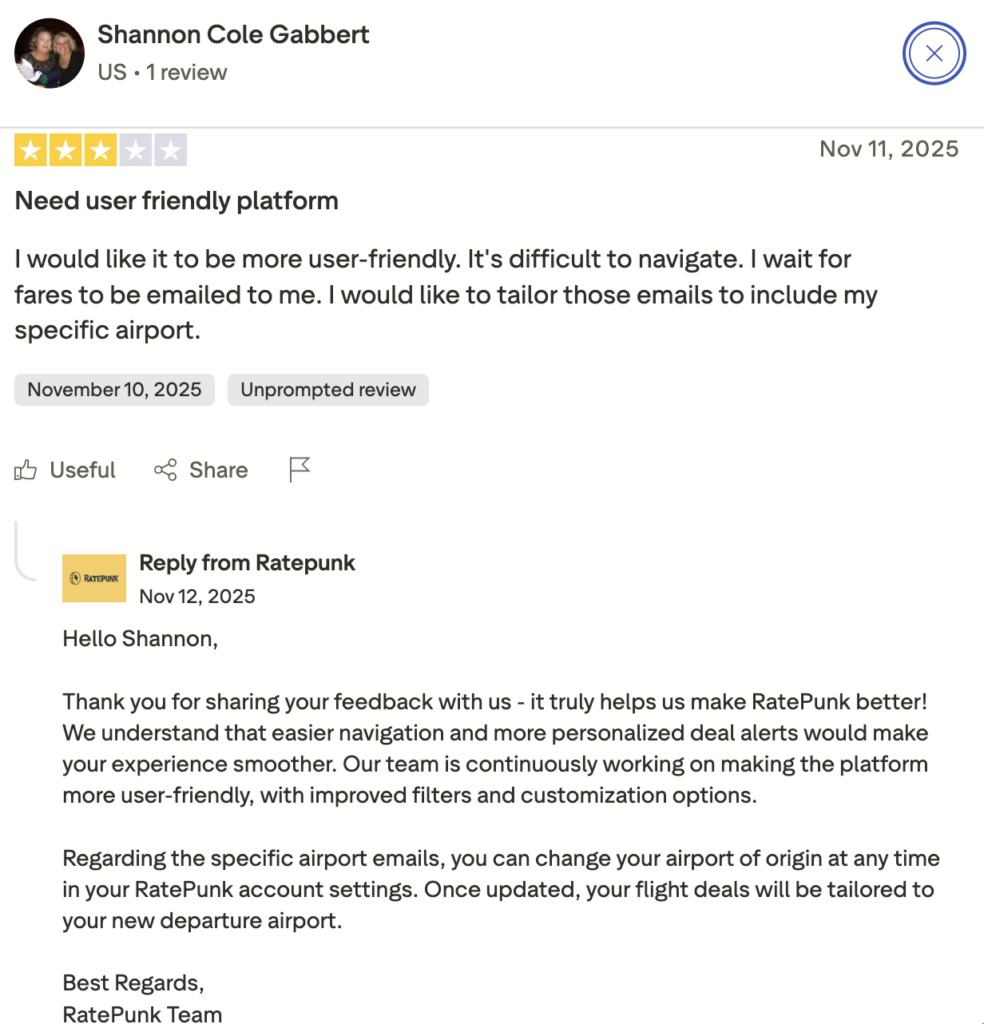
This user, for instance, mentioned how the site took some time to learn (which matched my experience), but again, once you’ve gotten used to it and learned what the numbers and metrics mean, RatePunk becomes an awesome tool.


Convenience and time savings are another common praise point across multiple review platforms, as well as how the subscription price (if you do decide to pay it) is fair.

There was one user who had a negative experience with RatePunk, but it seemed like customer service was responsive enough that they amended their comments. While I’ve never had to contact their CS before, it’s good to know that they’re fast and responsive to complaints.

Negative feedback centered around design issues. Many users reported the interface not being user-friendly or intuitive enough. That’s my main concern at first, as well. While I’m alright with scrolling and learning what each number or metric means, many people don’t have the patience or know-how to do that. And, as expected, some people had issues with the email notifications, as well. Good thing they did respond and promise an update to fix all this in the near future!
Pricing, Subscriptions, and Refunds
RatePunk operates on a subscription model. Base membership costs €23.99 annually and includes access to deals from a single home airport across all channels.
If you regularly fly from multiple cities, you can upgrade to add one, three, or unlimited home airports for additional fees that scale up accordingly (I didn’t test these tiers, however). Travelers who book flights rarely, like once or twice per year, might find it harder to justify the subscription cost versus simply doing manual research for those occasional trips. But the refund policy is quite generous with a 14-day money-back guarantee, so if you test the service and find it doesn’t meet your needs or deliver the savings you were hoping for, you’re always free to cancel. Admittedly, it’s one of the things that made me sign up in the first place.
RatePunk vs Other Flight Tools
Of course, even before I bought a subscription, I tested it thoroughly against other tools – some of which are free, like Google Flights, Scott’s Cheap Flights (now called Going), and Hopper.
Google Flights is free and definitely the most comprehensive. Its date flexibility matrix is excellent. Price tracking works well. You can explore routes you hadn’t considered and play around with different departure and return date combinations to find the cheapest possible option within a broader window. However, Google Flights demands much more active management. You need to remember to check prices, manually compare routes across multiple searches, and set up individual alerts for specific trips rather than receiving curated recommendations automatically.
Going specializes in curating mistake fares and exceptional deals, often with more dramatic savings than typical promotional pricing you’d find through regular searches. The service operates primarily through email newsletters rather than an app or interactive dashboard, which means less flexibility in customizing alerts for your specific needs, but potentially access to truly extraordinary deals that algorithms might miss because they require human judgment to recognize as genuinely unusual. RatePunk, I find, offers more control over specific routes and dates through its app-based custom alerts and provides both app and web-based access for active searching.
Hopper uses predictive algorithms to recommend whether you should book now or wait for prices to drop based on historical patterns and forecasting models. This future-oriented approach differs fundamentally from RatePunk’s focus on currently available deals. Hopper is essentially betting on if prices will go up or down, whereas RatePunk shows you what’s available right now and lets you decide if it’s good enough to pull the trigger. Hopper’s great if you have extremely flexible timing, but if you have a firmer schedule, RatePunk’s immediate deal presentation is more useful.
The honest comparison reveals that no single tool dominates every use case, which is why I still keep Google Flights bookmarked despite subscribing to RatePunk. They serve different purposes depending on the trip.
Final Verdict: Is RatePunk Worth It?
After regular use across multiple trips and several different travel contexts – yes! RatePunk justified its subscription cost for my travel patterns, but I’d be lying if I said it was some revolutionary tool that completely changes how flight booking works.
It’s going to work best for very frequent travelers who book at least three to four flights a year or more, and value convenience right next to cost savings. If you’re someone who finds flight research tedious and would rather delegate that work to an automated system that handles the busywork, the time savings alone may make the membership fee worth it no matter if you find dramatically better prices or not.
Frequently Asked Questions
What is RatePunk?
RatePunk is a flight-deal discovery tool that monitors prices across multiple booking platforms and surfaces favorable deals through a web dashboard, mobile app, and email alerts. The app doesn’t sell flights, but it redirects users to airlines or travel providers when they find a deal they like and are ready to book.
How does RatePunk work?
The platform’s algorithm scans available flights and finds deals that balance cost with convenience factors like flight duration and number of layovers. Users set a home airport, receive personalized deal recommendations based on that location, and can create custom alerts for specific routes and travel dates if they’re monitoring particular trips.
How does RatePunk compare to other deal-finding tools?
RatePunk emphasizes convenience and consolidated recommendations across multiple channels. Specialized services like Going may surface more dramatic deals through human curation, but RatePunk offers more flexibility overall through its multi-channel notification system and passive discovery features.
Is RatePunk safe to use?
RatePunk doesn’t handle payment processing directly since bookings occur through airlines or travel providers. The platform requires browser permissions to track flight prices, but data collection is focused on travel preferences rather than broader browsing history.